Pore pressures (Grid and ru)
The Pore pressures window decides where the water pressure at the base of each slice comes from: from the water table, from an ru coefficient per material, or from a grid of points u(x,y). You need the grid when a drawn water table is not enough: dams, levees, slopes with seepage, piezometer readings.
Watch the video
This window is in the "Grid and ru" chapter of the video tutorial Seepage, pore pressures and rapid drawdown.
The Pore pressures group of the WATER TABLE tab has three buttons:
| Button | What it does |
|---|---|
| Grid and ru | pore pressure grid u(x,y), ru coefficient per material, cos²θ correction of the water table (this page) |
| Seepage | steady-state finite element seepage: the result becomes the u(x,y) grid (Seepage) |
| Rapid drawdown | three-stage rapid drawdown check (Rapid drawdown) |
Step by step
-
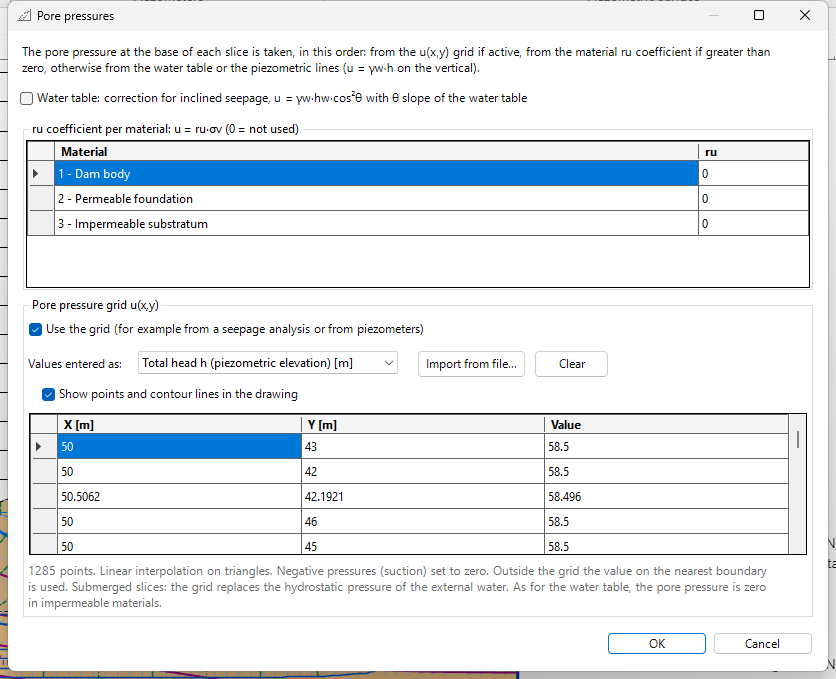
WATER TABLE tab → Pore pressures group → Grid and ru. The Pore pressures window opens.
-
At the top, read the order of priority (see below): it is the rule Slope applies slice by slice.
- If the water table is inclined and you want to account for seepage parallel to it, tick Water table: correction for inclined seepage.
- In the ru coefficient per material table, type ru for the materials you want to treat this way (0 = not used).
- To use a grid of points, tick Use the grid, choose in Values entered as the meaning of the Value column, then type the points in the table or read them with Import from file....
- Tick Show points and contour lines in the drawing to see the grid in the section.
- Press OK. The next stability analysis (F5) uses the new pressures.
Where the pore pressure comes from: order of priority
For each slice the pore pressure at the base is taken, in this order:
- from the u(x,y) grid, if active;
- from the ru coefficient of the material, if greater than zero: u = ru·σv;
- otherwise from the water table or the piezometric lines (u = γw·h on the vertical), with the cos²θ correction if active.
As for the water table, in impermeable materials the pore pressure is zero, whatever the source. The tick is the Permeability column of the Geotechnical properties, the same as the Pore pressures in stability (permeable) column of the Seepage window.
Correction for inclined seepage (cos²θ)
With Water table: correction for inclined seepage the pressure below an inclined water table is no longer hydrostatic on the vertical but
where hw is the height of the water table above the base of the slice and θ the slope of the water table at the slice. It is the pressure of seepage parallel to the water table (equipotentials perpendicular to it). Use it for slopes with an inclined water table and downslope seepage: it lowers the pressure compared with the hydrostatic assumption. It applies to the water table only, not to piezometric lines. With the seepage grid it is not needed: the grid takes priority and already accounts for the flow direction.
ru coefficient per material
In the ru coefficient per material table you give each material a value of ru between 0 and 1:
with σv the total vertical stress at the base of the slice. ru = 0 means "not used": the water table applies to that material. It is the classic way to represent construction pore pressures in embankments and dam cores, and it is handy for quick checks.
Example: in the Earth dam template, ru = 0.2 on the Dam body gives a pore pressure equal to 20 % of the total vertical stress in the dam body. If the grid is active, the grid still takes priority.
Pore pressure grid u(x,y)
With Use the grid the pressure is interpolated from a set of points (x, y, value), for example read from piezometers or computed with seepage.
Values entered as gives the meaning of the Value column:
| Choice | Meaning |
|---|---|
| Pore pressure u | pressure in the project units |
| Total head h (piezometric elevation) | u = γw·(h − y) |
| Pressure head u/γw | metres of water above the point |
Import from file
Import from file... reads a text file with three numbers per row (x, y, value), separated by space, tab, semicolon or comma. Rows that do not start with three numbers (headers, comments) are skipped. If the header gives the type of value, Slope proposes it in Values entered as.
Example: the file Basin - hydrostatic pore pressure grid.csv in the Examples\Seepage and Pore Pressures folder of Slope (2535 points for the example Basin.stax):
x;y;h
0;0;341
0;10;341
0;20;341
...
The header x;y;h says the values are total heads (Total head h). With h = 341 everywhere the grid reproduces the hydrostatic condition of the water table: the factor of safety is the same as with the water table alone.
Clear deletes all the points. With very large grids the table shows only the first points, but the analysis uses all of them.
How it is interpolated
- linear interpolation on triangles (Delaunay triangulation of the points): at least 3 non-collinear points are needed;
- negative pressures (suction) set to zero;
- outside the grid the value on the nearest boundary is used;
- in submerged slices (free water above the ground) the grid replaces the hydrostatic pressure of the external water;
- in impermeable materials the pressure stays zero.
If the maximum pressure of the grid corresponds to a water height much larger than the vertical extent of the grid, Slope asks for confirmation: usually the wrong type of value was chosen (for example elevations read as pressures).
With Show points and contour lines in the drawing the points and the contour lines of u are drawn in the section, inside the layers only.
Grid from seepage
The Use in the analysis button of the Seepage window fills the grid with the mesh nodes (in the Earth dam template 1285 points, as total head h) and activates it. If you then edit the points by hand in this window, the grid is no longer the seepage grid and the flow net is no longer drawn; permeabilities, boundary conditions and rapid drawdown data are unchanged.
When to use what
| Situation | Recommended source |
|---|---|
| Slope with a gently inclined water table, no significant seepage | Water table (piezometric lines for confined aquifers) |
| Inclined water table with seepage parallel to the slope | Water table with cos²θ correction |
| Embankments and cores just built, quick checks | ru per material |
| Piezometer readings across the section | Grid (measured points, as total head or pressure) |
| Dams, levees, embankments with a core, slopes with seepage | Grid from Seepage |
Calculation report
The report gives the source of pore pressures used (grid with number of points and interpolation rules, ru per material, cos²θ correction) and, if the grid comes from seepage, the summary of the seepage analysis.
Saving
Grid, ru, cos²θ correction, seepage and rapid drawdown data are saved in the project file (.stax). Files of earlier versions open without these data (default values).
©Geostru