Steady-state seepage
The Steady-state seepage window computes with finite elements how water flows through the section. The result (hydraulic head at each node) becomes the pore pressure grid of the stability analysis: the pressures at the base of the slices no longer come from a hand-drawn water table, but from a real flow net. Use it for earth dams, levees, embankments with a core and slopes with seepage.
Watch the video
This window is explained box by box in the "Steady-state seepage" chapter of the video tutorial Seepage, pore pressures and rapid drawdown.
The example on this page is the Earth dam template with the default values. To open the window: WATER TABLE tab → Pore pressures group → Seepage.
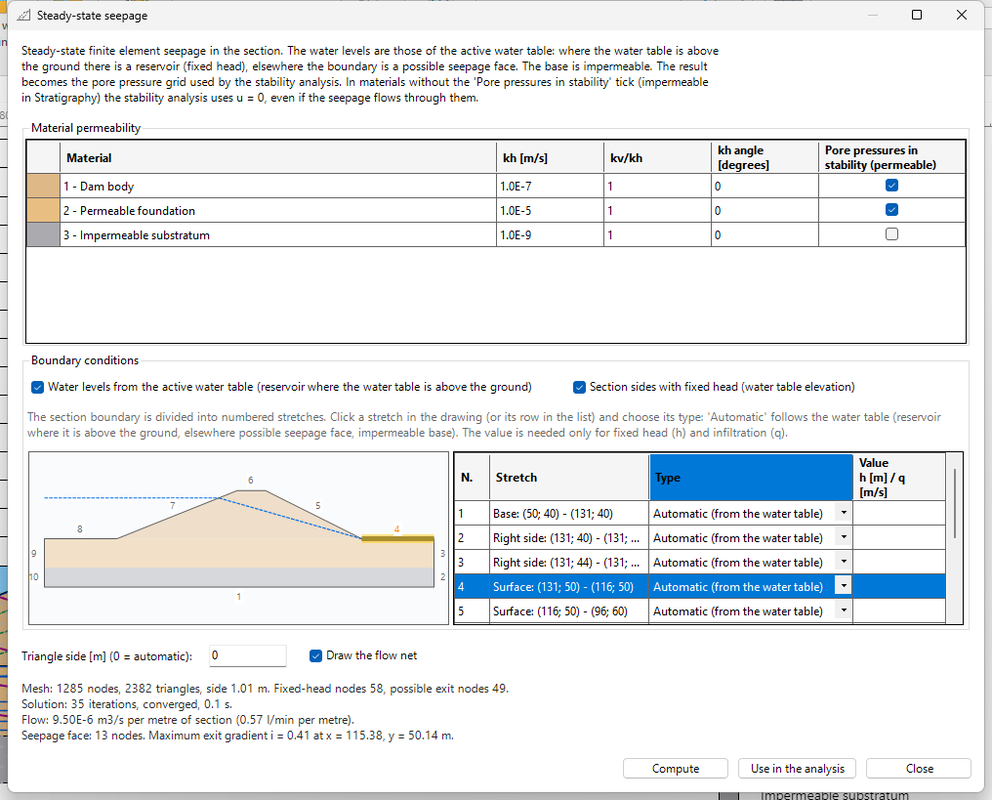
Follow the window from top to bottom.
1. The description
The text at the top sums up the method:
- steady-state seepage with finite elements in the section;
- the water levels come from the active water table: where the water table is above the ground there is a reservoir with fixed head, elsewhere the boundary is a possible seepage face;
- the base of the section is impermeable;
- the result becomes the pore pressure grid used by the stability analysis.
2. Material permeability
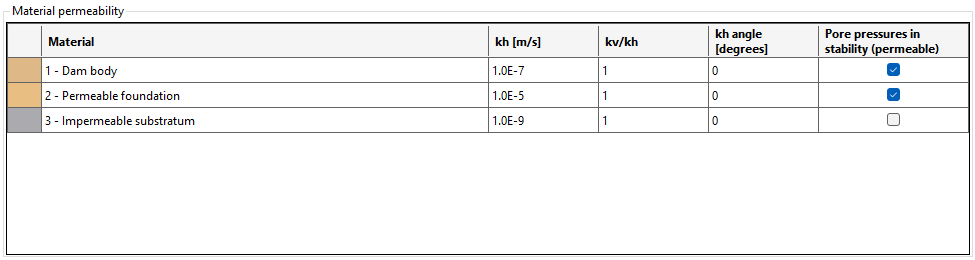
One row for each layer:
| Column | Meaning |
|---|---|
| kh [m/s] | horizontal permeability. In the example: dam body 1E-7, permeable foundation 1E-5, impermeable substratum 1E-9 |
| kv/kh | anisotropy: ratio of vertical to horizontal permeability. 1 = isotropic; layered soils are often less permeable vertically, for example 0.1 |
| kh angle [degrees] | inclination on the horizontal of the direction of higher permeability, for inclined layers. 0 = horizontal |
| Pore pressures in stability (permeable) | see point 3 |
Indicative orders of magnitude of kh:
| Soil | kh [m/s] |
|---|---|
| Clean gravel | 1E-2 – 1 |
| Clean sand, sand and gravel | 1E-5 – 1E-2 |
| Fine sand, silt, mixtures of sand, silt and clay | 1E-9 – 1E-5 |
| Homogeneous unfissured clay | < 1E-9 |
For the pressures what matters most is the ratio between the permeabilities of the materials; the absolute value affects the flow rate.
3. The "Pore pressures in stability (permeable)" column
It is the same Permeability tick of the Geotechnical properties (Stratigraphy): changing it here or there is the same thing.
- Ticked: in the stability analysis the material uses the seepage pore pressures.
- Unticked: in the stability analysis u = 0 in that material, even if water flows through it. Use it for impermeable substrata, rock, clay cores to be checked in total stresses.
In the example the impermeable substratum is unticked: seepage crosses it with kh = 1E-9, but in the stability analysis its pore pressure is zero.
4. Boundary conditions

Water levels from the active water table (reservoir where the water table is above the ground) (ticked by default):
- where the water table is above the ground there is a reservoir: fixed head equal to the water table elevation;
- on the rest of the exposed surface the boundary is a possible seepage face: water may come out, the pressure cannot exceed atmospheric pressure;
- the base is impermeable.
Section sides with fixed head (water table elevation):
- ticked: the two vertical sides get the head of the water table there, as if the ground continued beyond the edges of the section;
- unticked: the sides allow no flow (impermeable).
For a section that ends far from the structure, leave it ticked. Untick it if the sides are real impermeable boundaries.
5. Boundary stretches
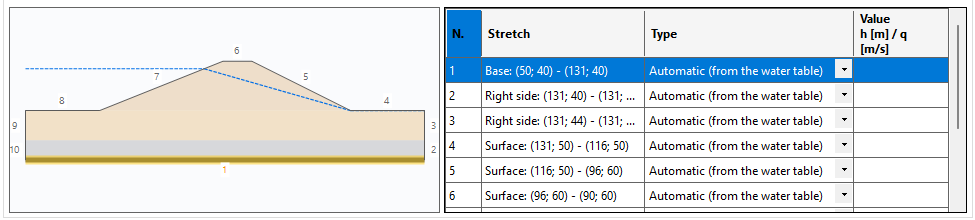
The section boundary is divided into numbered stretches: the base, the two sides and each segment of the ground surface. On the left is the sketch with the numbers, on the right the list:
| Column | Meaning |
|---|---|
| N. | stretch number (the same as in the sketch) |
| Stretch | position and coordinates, for example Surface: (131; 50) - (116; 50) |
| Type | condition of the stretch (see point 6) |
| Value h [m] / q [m/s] | only for Fixed head h (total head, i.e. water elevation) and Infiltration q (inflow) |
To choose a stretch, click it in the sketch or click its row in the list: the stretch is highlighted and the list of types opens.
6. The six boundary types
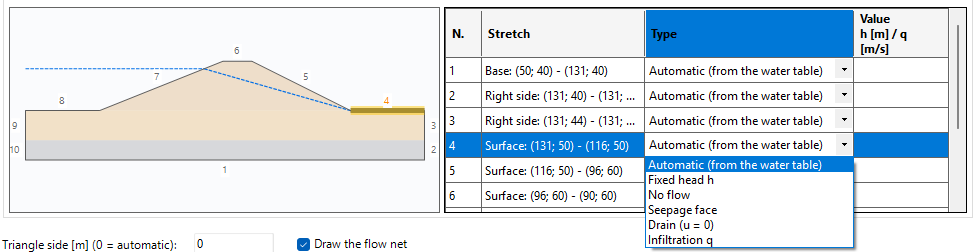
| Type | When to use it | Value |
|---|---|---|
| Automatic (from the water table) | normal case: follows the active water table (reservoir where it is above the ground, elsewhere possible seepage face, impermeable base) | — |
| Fixed head h | known water level on that stretch: a river, a canal, a well | h [m] |
| No flow | impermeable boundary: a cut-off wall, a lining, sound rock | — |
| Seepage face | water may come out at atmospheric pressure (u ≤ 0); Slope finds where it actually comes out | — |
| Drain (u = 0) | toe drains, blankets and filters: zero pressure on the whole stretch | — |
| Infiltration q | inflow per unit area (horizontal projection), for example rain | q [m/s] |
The seepage face does not apply where the water table puts the boundary under water (reservoir).
7. Example: a drain downstream
- In the sketch, click stretch 4 (Surface: (131; 50) - (116; 50), the ground surface downstream of the dam).
- In the list choose Drain (u = 0).
-
Press Compute. The summary says: flow 9.59E-6 m³/s per metre of section (0.575 l/min per metre) and No active seepage face: the drain collects all the water.

-
Set stretch 4 back to Automatic (from the water table) and press Compute again: the seepage face comes back, with 13 nodes.
8. Triangle side and flow net
- Triangle side [m] (0 = automatic): size of the elements. With 0 Slope uses 1/80 of the largest dimension of the section (1.01 m in the example). Smaller triangles give a more accurate solution and a longer computation.
- Draw the flow net: after Use in the analysis, draws phreatic line, equipotentials, flow lines and seepage face in the section.
9. Compute and read the summary
Press Compute. The summary appears below; with the Earth dam template:

| Row | Example | How to read it |
|---|---|---|
| Mesh | 1285 nodes, 2382 triangles, side 1.01 m. Fixed-head nodes 58, possible exit nodes 49 | size of the model; fixed-head nodes are those under the reservoir (and on the sides), possible exit nodes those of the exposed surface |
| Solution | 35 iterations, converged, 0.1 s | it must say converged; if it says NOT converged do not use the result (see the notes) |
| Flow | 9.50E-6 m³/s per metre of section (0.57 l/min per metre) | water crossing the section, per metre of dam length |
| Seepage face | 13 nodes. Maximum exit gradient i = 0.41 at x = 115.38, y = 50.14 | where water comes out of the ground and the maximum hydraulic gradient at the exit |
The exit gradient
The exit gradient i measures how fast head is lost where water comes out. The closer it gets to the critical gradient i_cr = γ'/γw (about 1 for most soils), the higher the risk of piping and internal erosion at the toe. In the calculation report Slope gives i_cr and the factor of safety against piping i_cr / i. For the factors required by the hydraulic check, refer to the code you apply.
In the example i = 0.41 at the downstream toe: well below 1.
10. Use in the analysis
Press Use in the analysis: the window closes, the solution becomes the pore pressure grid (activated) and the section shows the flow net:
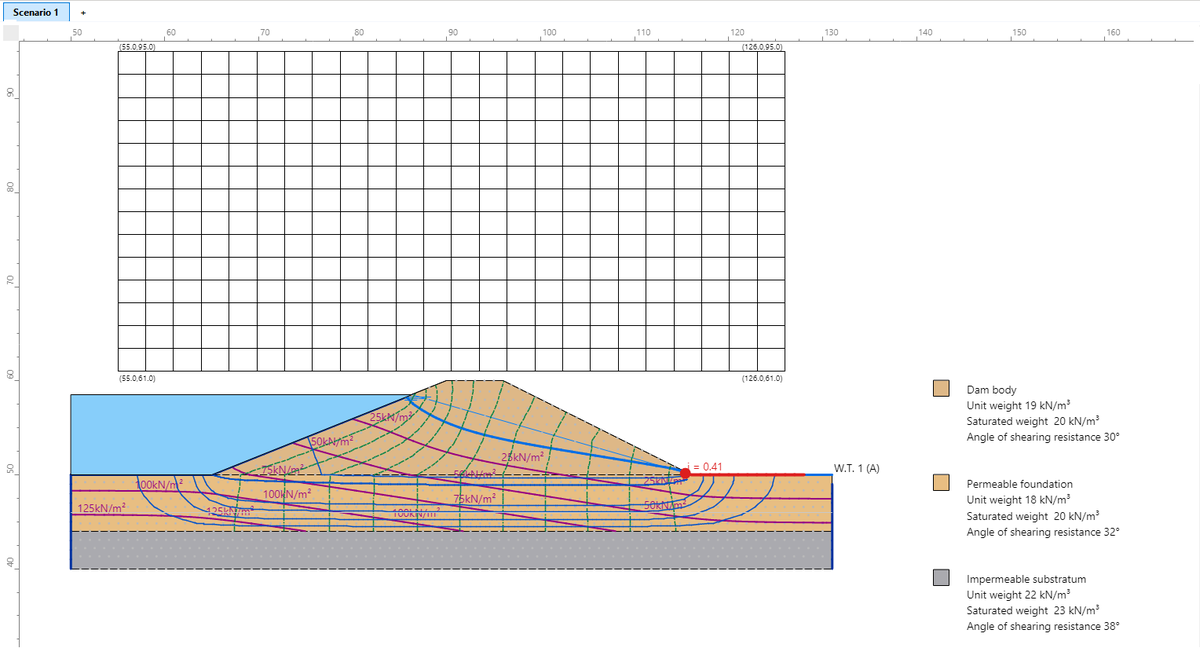
- the computed phreatic line (thick blue line);
- the equipotentials (dashed) and the flow lines;
- the isobars of pore pressure, in kN/m²;
- the seepage face in red;
- the point of maximum exit gradient, labelled i = 0.41.
Use in the analysis is enabled only after a successful Compute. Close closes the window without changing the pore pressure grid.
Activated version
In the non-activated version of Slope you can compute and draw the flow net; Use in the analysis, that is using the result in the stability analysis, needs the activated version. The Grid and ru window stays available.
11. Effect on stability
With the seepage grid press F5 (COMPUTATION → Perform analysis). In the Earth dam template, Bishop method:
| Pore pressures | Fs | Critical surface |
|---|---|---|
| Grid from seepage | 1.36 | downstream face (centre 114.17; 70.71, R = 22.34 m) |
| Water table only (Use the grid unticked in Grid and ru) | 1.26 | downstream face (centre 112.69; 69.50, R = 21.19 m) |
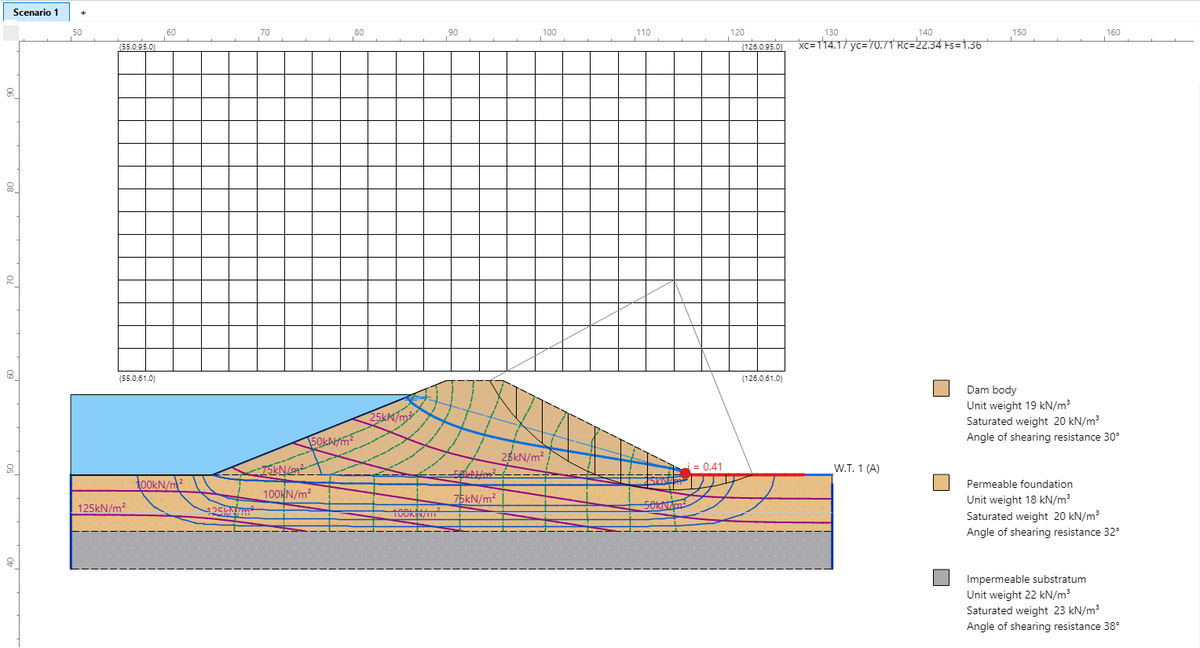
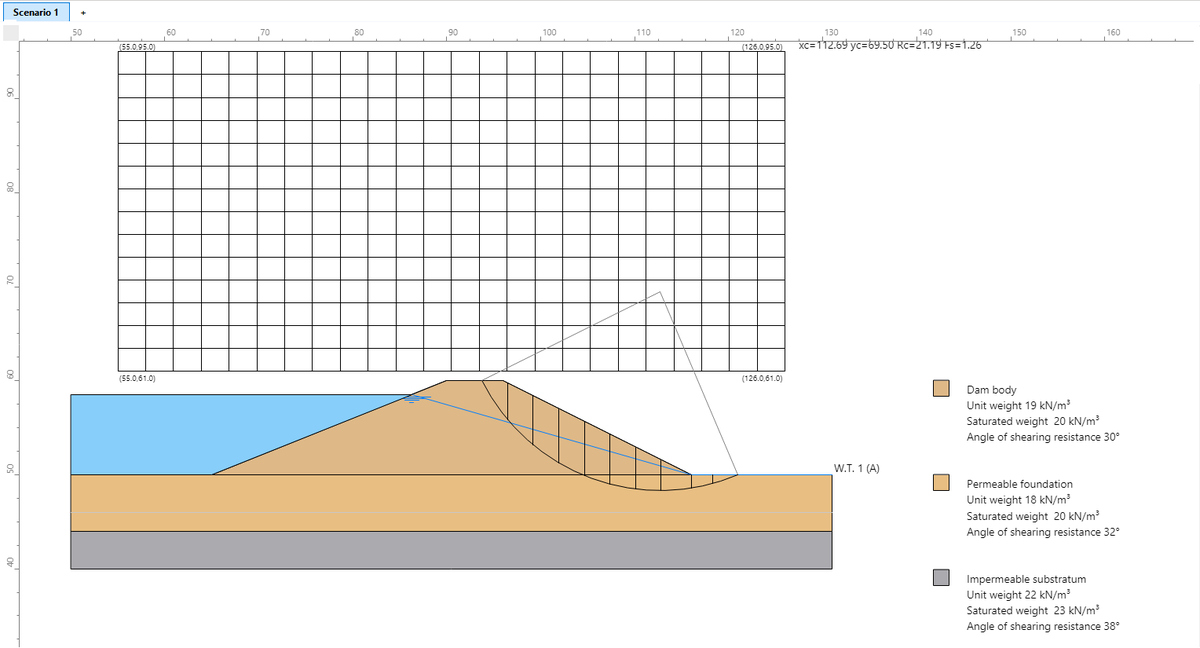
The difference comes from the pressures in the dam body. The drawn water table is a straight line from the reservoir to the downstream toe, and below it the pressure is hydrostatic on the vertical. Seepage computes where the phreatic line really is: in the flow net the computed phreatic line (thick blue line) is a curve that lies below the straight water table (thin blue line). With the water table alone, therefore, the pressures under the downstream face are higher and the factor of safety lower.
In this model the water table alone is on the safe side, but this is not a rule: with other geometries, very permeable foundations or drains, a drawn water table can also underestimate the pressures. For dams and levees use the seepage grid.
Method
- Linear triangular elements, Darcy's law with anisotropic permeability.
- Unsaturated zone with relative permeability kr decreasing linearly from 1 (zero pressure) to a minimum, over a suction height equal to the element size; the phreatic line is the zero-pressure line.
- Iterative solution: the unsaturated band starts wide and narrows in phases; kr is updated with an adaptive step. The seepage face (nodes where water comes out) is found during the iterations.
- If at the end only a local oscillation remains with steady flow, the solution is accepted and the summary says so (residual local oscillation).
Validation
Results on cases with an analytical solution or with published solutions (validation report in the Examples\Seepage and Pore Pressures\Johnson Reservoir folder of Slope):
| Case | Reference | Slope |
|---|---|---|
| Confined flow in a rectangle, linear head | exact solution | head error < 1E-11 m |
| Rectangular dam on an impermeable base, flow | Dupuit-Charny formula (exact for the flow) | +0.7 % with side 0.125 m |
| Block with infiltration (rain) | published finite element solutions: maximum water table 4.49 – 4.61 m | 4.64 m; mass balance −1.2 % |
| Homogeneous trapezoidal dam (Bowles example) | Bowles: 1.10E-3 – 1.28E-3 m³/min/m | 1.29E-3 m³/min/m |
| Dam with toe drain (Bowles example) | Bowles 3.8E-6; published solutions 4.23E-6 – 4.28E-6 m³/s/m | 4.02E-6 m³/s/m |
| Zoned dam with a core 1000 times less permeable (Johnson Reservoir) | convergence with a strong permeability contrast | converged, 2.08E-6 m³/s/m |
Notes
- The analysis needs an active water table: without fixed-head nodes the problem has no solution and Slope says so.
- Permeabilities, boundary conditions and results are saved in the project.
- Seepage is steady-state. For rapid drawdown use the three-stage method (Rapid drawdown), which does not need a transient seepage analysis.
Frequently asked questions
I computed the seepage but the factor of safety does not change. Why? Check three things: after Compute did you press Use in the analysis? Only that button moves the result into the pore pressure grid. In WATER TABLE → Grid and ru, is Use the grid ticked? Is the material crossed by the critical surface permeable (Pore pressures in stability (permeable))? If not, its pore pressure is zero whatever the source.
The seepage face does not appear. Is it an error? No, if water comes out somewhere else. It happens when the stretch where water would come out is set to Drain (u = 0) (the drain collects all the water) or No flow. The summary says No active seepage face. Set the stretch back to Automatic (from the water table) or Seepage face and press Compute again.
In rapid drawdown, what elevation do I enter for the water table after drawdown? The elevation is absolute, in the same reference system as the profile, not the water depth. In the Earth dam template the base is at 50 m: to leave 1 m of water, enter 51. See Rapid drawdown.
The centre of the critical surface is on the edge of the grid of centres. Is the result reliable? Not yet: the true minimum may lie outside the grid. Widen the grid of centres towards the side of the minimum and run the analysis again, until the critical centre is inside.
©Geostru