The "Earth dam" template
The Earth dam template creates in one step the section of a homogeneous earth dam on a permeable foundation and an impermeable substratum, with the reservoir upstream. Slope builds profile, layers, materials and water table, computes the steady-state seepage and uses it for the pore pressures. Use it to try the water table, seepage and rapid drawdown tools right away, or as a starting point for a real dam.
Watch the video
The template is the first chapter of the video tutorial Seepage, pore pressures and rapid drawdown.
Activated version
The Earth dam template is available in the activated version of Slope.
Step by step
-
Start Slope. On the start screen How do you want to start?, under Start from a slope template, click the Earth dam tile (the last one on the right).
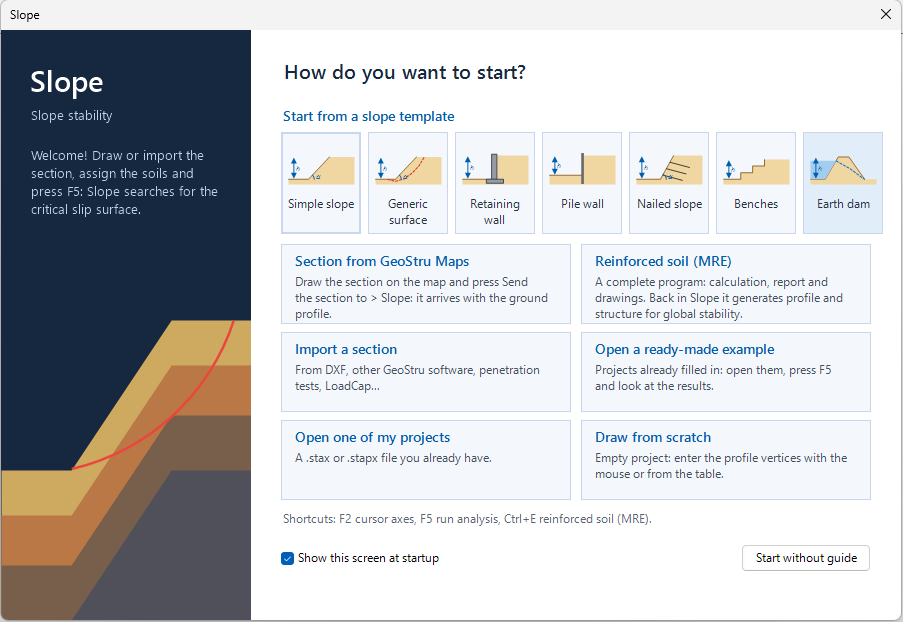
-
The Earth dam window opens. At the top is the description of the template; on the right, the sketch of the section updates while you type the data.
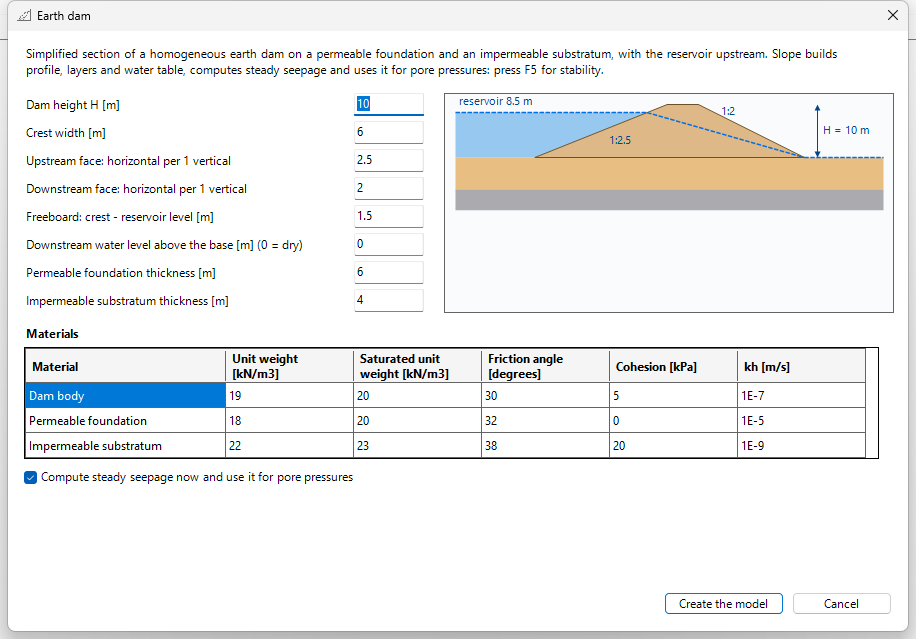
-
Enter the geometry (table below). The face slopes are horizontal per 1 vertical: 2.5 means 2.5 m horizontally for each metre of height.
- Check the Materials table: unit weights, friction angle, cohesion and permeability k of each soil.
- Leave Compute steady seepage now and use it for pore pressures ticked if you want the flow net ready.
- Click Create the model.
Geometry
| Field | Default | What it generates |
|---|---|---|
| Dam height H [m] | 10 | crest elevation above the base |
| Crest width [m] | 6 | horizontal top |
| Upstream face: horizontal per 1 vertical | 2.5 | slope of the face towards the reservoir |
| Downstream face: horizontal per 1 vertical | 2 | slope of the downstream face |
| Freeboard: crest - reservoir level [m] | 1.5 | reservoir level = H − freeboard (here 8.5 m above the base) |
| Downstream water level above the base [m] (0 = dry) | 0 | water at the downstream toe, if any |
| Permeable foundation thickness [m] | 6 | layer 2 below the dam |
| Impermeable substratum thickness [m] | 4 | layer 3, bottom of the section |
The freeboard must be between 0 and the dam height, the downstream level between 0 and the reservoir level; thicknesses cannot be negative. If a value is wrong, the window says so and does not create the model.
Materials
| Material | Unit weight [kN/m³] | Saturated unit weight [kN/m³] | Friction angle [°] | Cohesion [kPa] | kh [m/s] |
|---|---|---|---|---|---|
| Dam body | 19 | 20 | 30 | 5 | 1E-7 |
| Permeable foundation | 18 | 20 | 32 | 0 | 1E-5 |
| Impermeable substratum | 22 | 23 | 38 | 20 | 1E-9 |
The permeability kh is the same as in the Seepage window. The substratum is created impermeable: in the stability analysis its pore pressure is zero.
What you see after "Create the model"
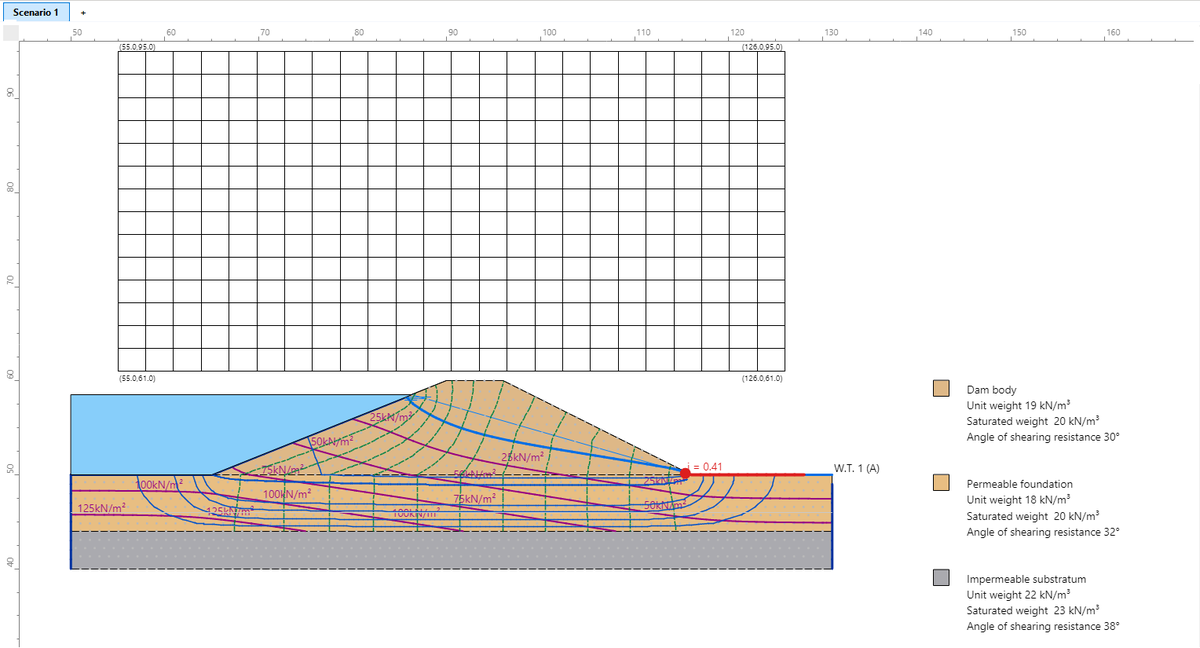
Slope creates:
- the profile of the dam and of the ground, from x = 50 to x = 131 m, with the base of the dam at elevation 50 m (elevations are absolute);
- the three layers: dam body, permeable foundation (from 50 to 44 m), impermeable substratum (from 44 to 40 m);
- water table 1, which upstream is above the ground and so represents the reservoir (elevation 58.5 m);
- the grid of centres of the circular surfaces, from (55; 61) to (126; 95), covering both faces;
- if the seepage tick was on, the pore pressure grid from the steady-state seepage and, in the drawing, the flow net:
- the computed phreatic line (thick blue line inside the dam);
- the equipotentials (dashed) and the flow lines;
- the isobars, lines of equal pore pressure, in kN/m²;
- the seepage face in red at the downstream toe, where water comes out of the ground;
- the point of maximum exit gradient, with its value: i = 0.41.
Now press F5 (or COMPUTATION → Perform analysis) for the stability: with the default values the critical surface is on the downstream face with Fs = 1.36 (Bishop method). The comparison with the water table alone is in the Seepage page.
Grid of centres
After every analysis check that the critical centre is not on the edge of the grid: if it is, widen the grid and run the analysis again (see Seepage – frequently asked questions).
From the template to your project
The template is a simplified section. For a real dam you can:
- edit profile, layers and materials as in any project (Inserting vertices, Geotechnical properties);
- draw the section from scratch or import it from DXF or GeoSection (Data import);
- then run the seepage again with the boundary conditions of your dam.
©Geostru