Definition of the calculation phases
To perform a local seismic response analysis with RSL III 2D, two phases must be defined. In the first phase (Phase 1) the initial stress state of the defined model is computed. The second phase (Phase 2) consists of the actual analysis of the local seismic response of the model considered, in which, following the assigned accelerograms, the response spectrum is computed.
After generating the calculation mesh, the software automatically creates a calculation phase (Phase 1), which can be viewed from the Tools panel.

To define the second calculation phase, click on "Construction phases" and then, in the window that opens, click on the + symbol to add the second phase. When dealing with a local seismic response analysis, make sure that all the regions active in Phase 1 are also active in Phase 2.
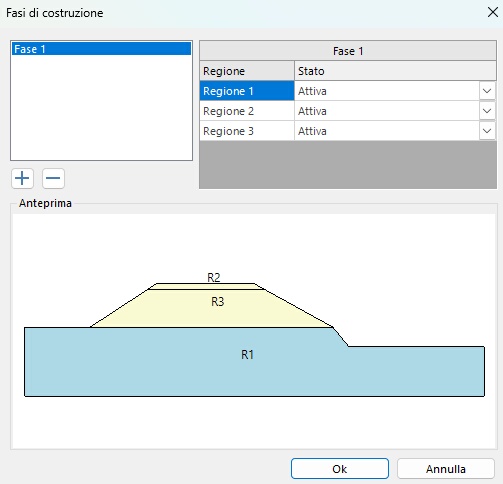
After clicking OK, the second phase will have been added to the drop-down menu of the Tools panel:
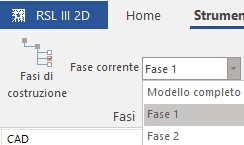
By selecting the relevant phase, it will then be possible to define the boundary conditions of the selected phase.
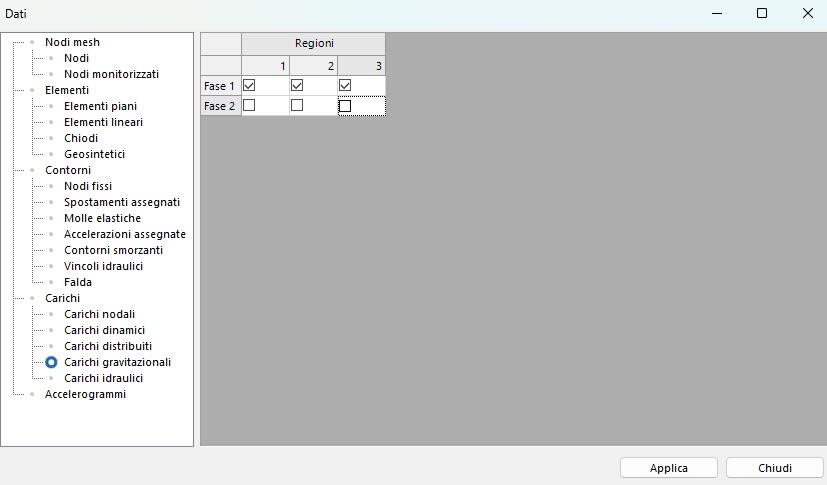
Before proceeding, it must be taken into account that, in order to generate the stress state, the software applies gravity to the defined materials. It must be specified that gravity must be applied only in the first phase, the one in which the stress state is generated, while it must not be considered in the subsequent phases, since the stress state generated in the previous phase is imported. To this end, click on the "Data" button of the Home panel and, under "Loads" → "Gravitational loads", select only the regions active solely in Phase 1, as shown in the following screen.