Downhole
The full manual of Downhole is here: https://help.geostru.io/downhole/en/
When importing .sg2, .dat etc. track files, these are displayed with a flickering interface that makes the track import tool unusable
Start the software from its installation folder.
To find out where it is, open the software and press ‘Open main folder’. Create a shortcut on the desktop of the file ‘DownHole.exe’. For subsequent starts, use this shortcut.
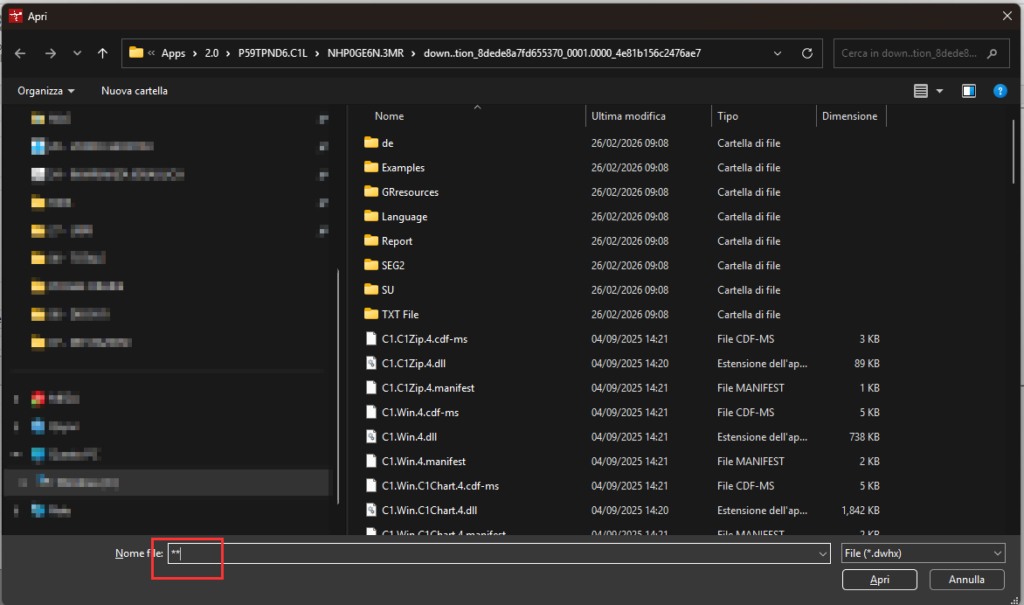
How do I open files with the old *.dwh extension?
To open old Downhole files with the *.dwh extension, simply type the symbols ** into the file name field in the Open File window and press Enter. All the files will appear; at this point, simply select the file with the *.dwh extension
Didn't find the answer? If your program has an active update plan, open a request on support.geostru.eu.