Materials assignment
The software offers the facility of a personalized database which gathers a wide range of materials that can be used for different regions of the triangulation.
For every material is necessary to define the Rn and Rt restitution parameters , the description and a color that allows the identification of the area.
A material can be assigned to a single element or to an entire region.
| Single element To assign a material to a single element choose the appropriate tool, click with the mouse on the element to alter and select a material from the pop-up window. N.B. To assign the same material to other single elements press the "Ctrl" key while selecting the elements. | 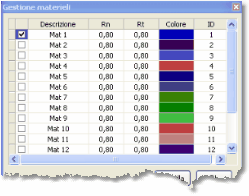 |
| Region To assign a material to a group of elements choose the appropriate tool, select an area from the graphic, click with the mouse and choose a material from the pop-up window. |